In our continuing quest to explore what goes on “under the hood” of digital humanities projects, this week we are moving from the front-end client-side user experience to the database “back end” on the server side, where all the data storage and information retrieval magic happens. In order to perform analysis, or present the results of our research to the public on the web, we first need to collect, categorize and store our data in a way that will give us the best combination of structure and flexibility.
Your experience with TimelineJS last week showed you that we can use a simple flat spreadsheet to store enough data to power a pretty impressive interactive interface using JavaScript alone, as long as we follow the format that its developers dictated. But what if we wanted to do different things with the same data? What if we wanted to reorder our data by something other than chronology, like people or buildings, or spatial location? And what if we wanted to model the relationships between those elements? Our spreadsheet is just not flexible enough for this. In order to store complex data sets, we need a more sophisticated way to store it; enter the relational database.
There is a vast amount of literature out there on database design theory and practice, but the articles we read for this week provide a good starting point into the general characteristics of relational databases, and the raging debates over how to move beyond them in the brave new world of ‘big data‘ in humanities research. The key takeaway from these debates is that “data” are not value free and neutral pieces of information. Any time we break information down and classify it into categories, we are imposing our human world view and experiences on the information, whether consciously or not. This is unavoidable, but the best way to deal with it honestly is to acknowledge our biases, document our decisions and explain our thinking at each step of the process. The resulting metadata (data about the data) are critical for successful scholarly projects, and we will discuss their importance throughout the course.
For today though, we are interested primarily in exploring how relational databases work in a typical DH project, which often shares a lot of similarities with how web applications work in general. So we are going to stick with what we already know and get to know databases by exploring the backend of a WordPress site.
Exercise
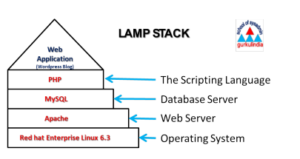 You set up your blogs with the hosted WordPress.com site, but to get all the flexibility of plugins and custom coding we need to download the server installation files from WordPress.org.
Normally you would need some space on a server running the LAMP stack (Linux, Apache, MySQL, and PHP) to install and run this, but we are going to explore using the free and easy to set up local host for Mac OS called MAMP.
Assignment
- Continue exploring the server environment on your own, and try to see if you can understand how the different pieces fit together within the LAMP (MAMP) stack itself and within the MySQL relational databases.
- Try to reproduce and populate the database that Stephen Ramsay describes in this article on your local host by either executing the SQL statements or using the phpMyAdmin graphical user interface that comes bundled with MAMP.
- One of the major musts when dealing with large scale data collection and storage is processing and cleaning the data for consistency. Now that we have integrated our data for the TimelineJS project, there are clearly inconsistencies and places where groups did not follow the rules I laid out in last week’s post.
- Look back through your data try to clean it up to be consistent with my original, especially as regards full size images
- Finally, write a blog post documenting your process for the TimelineJS project that includes the following
- A link to your original Google Sheet
- A link to your TimelineJS output on jsBin
- A description of the challenges you encountered when trying to conform our existing data to the format TimelineJS required and the steps you took to try to rectify them
